



Instructions for Geographic Names Proposal Submissions
The following instructions will help proponents complete the Domestic Names Committee proposal form.
Page 1 of Proposal Form – Acknowledgment for Reviewing Materials
To complete the Domestic Geographic Name Proposal Form, you must first confirm you have read several key documents and agree to work with U.S. Board on Geographic Names (BGN) staff. These include the Domestic Names Committee's (DNC) Guidance on Name Proposals, the USGS What is the Geographic Names Information System (GNIS)? webpages, and the DNC's Principles, Policies, and Procedures.
For an overview of the proposal review process, see the Domestic Names Committee Proposal Process Flowchart.
For new names only: if a geographic name appears in a published source, you must have already contacted The National Map staff by emailing tnm_help@usgs.gov. They must confirm that a proposal to the DNC is necessary because the publication is not an authoritative source. This step is not required for name changes or corrections.
It is crucial that you do not proceed with the form until these initial steps are completed.
Page 2 of Proposal Form – Preliminary Questions
In this section, proponents will need to answer a series of preliminary questions. These questions determine if your proposal falls within the scope of the DNC. The DNC reviews proposals for natural geographic features (land or water), reservoirs, canals, channels, and unincorporated populated places. They do not review proposals for Census, Civil, Military, or incorporated Populated Places. Answering "Yes" to any of these preliminary questions means the BGN will not consider your proposal, and you should not complete the application.
Page 3 of Proposal Form – Submission Details
Proponents should review the information on this page to understand how to submit their proposal once all required information has been completed. For any proposals requiring evidence such as landowner/trademark owner permission/approval of the proposal, a death certificate, obituary, or any additional supporting materials, please include with the submission package via email to BGNExec@usgs.gov, or by mail. Failure to provide the required evidence will result in the rejection of the proposal due to being incomplete. Proposals are considered incomplete and will be rejected if they do not follow the instructions throughout this manual and/or there is missing information, It is critical that all proponents carefully review the proposal form prior to submitting to ensure that all checked boxes are marked with a response, each text box has a response that fully addresses each question, or it is marked with “Not applicable” or “NA” whenever relevant. Staff will inform proponents if the proposal has been accepted or rejected. If accepted, the proposal will be processed and added to the Quarterly Review List. If rejected, the proposal will not be processed, and the proponent will have to resubmit a complete proposal form.
Pages 4 and 5 of Proposal Form – Name Details
In this section, the proponent will enter the proposed name in the text box and indicate the type of proposal being submitted by checking only 1 of the 4 boxes. Depending on the box selected, the proponent is then directed to the next appropriate section to complete. The options are to name a feature with no official name in GNIS (requiring completion of Section A), to change or correct an official name in GNIS (requiring Section B), to change or correct the location of an official name in GNIS (requiring Section C), or to change or correct both an official name and its location in GNIS (requiring Sections B and C).
Section A: New names.
The proponent must confirm that there is no official name in GNIS by checking the appropriate box. If “No” is checked for this question ONLY, BGN staff will reject the proposal due to incompleteness.
The proponent must provide answers in all text boxes. If the question is not relevant to the proposal, then please type in “Not applicable” or “NA”. Failure to provide responses in the text boxes, will result in the rejection of the proposal due to being incomplete.
Section B: Name changes.
This section requires the proponent to provide the current GNIS name and its Feature ID (4-7 digits). To retrieve the current name and Feature ID, go to the GNIS search tool and enter the name of the feature. Proponents should take caution to ensure that they are retrieving the Feature ID for the appropriate feature. For example, entering the name “Mount Rainier” in the Name search field will result in 4 features. The appropriate Feature ID for the mountain, in the State of Washington, is 1533614 (Figure 1).
The proponent must then provide responses in the text boxes to address why the name should be changed for Federal use, what is the significance of the name, and why the new name is appropriate. For this section, responses entered into text boxes must be less than 300 characters in length.
The proponent must provide answers in all text boxes. If the question is not relevant to the proposal, then please type in “Not applicable” or “NA”. Failure to provide responses in the text boxes, will result in the rejection of the proposal due to being incomplete.
Section C: Location changes.
This section requires the proponent to provide the current Feature ID (4-7 digits) and its coordinates in decimal degrees. To retrieve the Feature ID, go to the GNIS search tool and enter the name of the feature (Figure 1). Proponents should take caution to ensure that they are retrieving the Feature ID for the appropriate feature. For example, entering the name “Mount Rainier” in the Name search field will result in 4 features. The appropriate Feature ID for the mountain, in the State of Washington, is 1533614. By clicking on “Details” (Figure 1), the proponent can locate the coordinates of the feature by scrolling down to the “Coordinates” section of the pop-up window (Figure 2). Enter the decimal degrees into the text box for the current coordinates.
The proponent must provide answers in all text boxes. If the question is not relevant to the proposal, then please type in “Not applicable” or “NA”. Failure to provide responses in the text boxes, will result in the rejection of the proposal due to being incomplete.
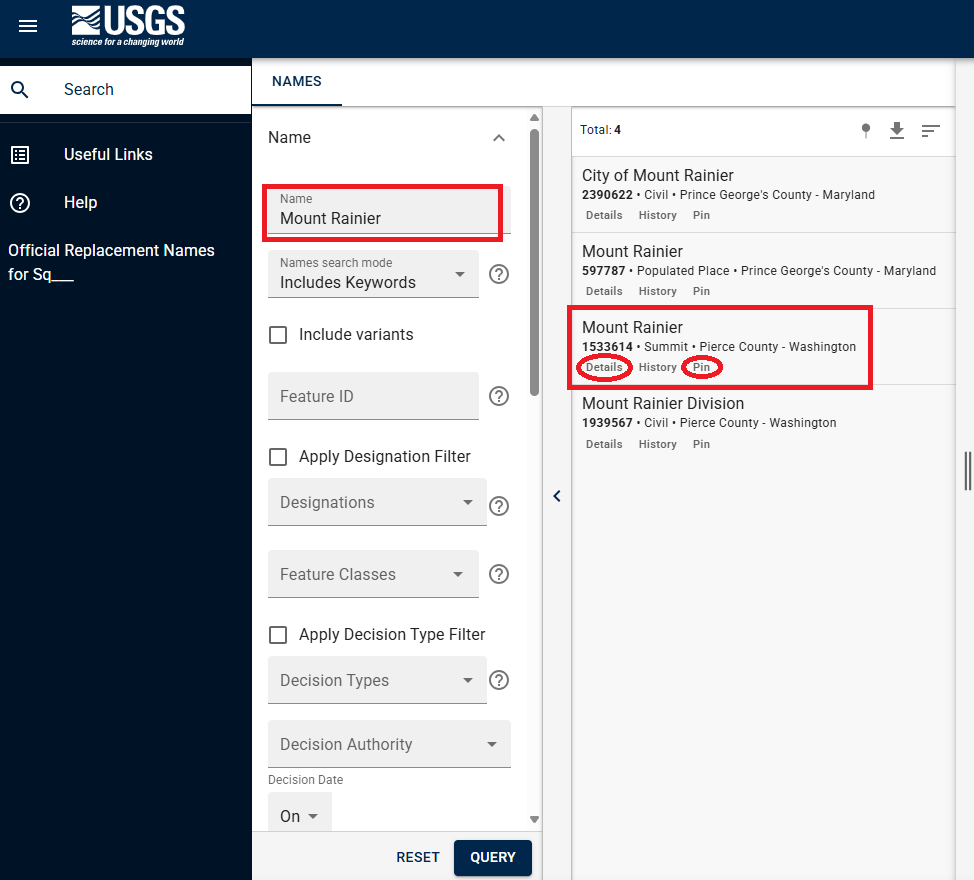
Figure 1 The screen capture shows all results for geographic features that use the name "Mount Rainier." Proponents should take caution to make sure they are recording the Feature ID of the appropriate geographic feature. In this case, the proponent is interested in the “Summit”. Clicking on “Details” will provide a Summary Report of additional information about the feature. Clicking on “Pin” will mark the feature on the map to the right (not pictured).
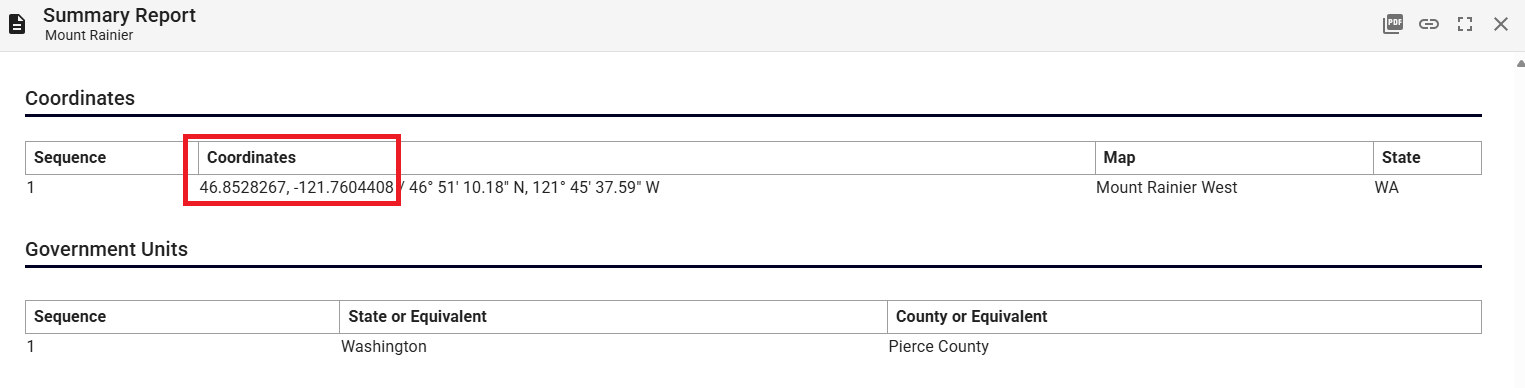
Figure 2 The screen capture shows a portion of the Summary Report when "Details" is selected from the feature. Proponents should record the decimal degrees into the coordinates text box on the proposal form.
Pages 6 and 7 of Proposal Form – Location Details
The "Location Details" section on pages six and seven requires specific information about the geographic feature. You need to identify the best-fitting GNIS feature type (up to 20 characters), noting that the DNC does not review proposals for Census, Civil, Military, or incorporated populated places. For a full list of feature types recorded in GNIS, please see GNIS Domestic Names Feature Classes.
In the following text boxes, the proponent should provide coordinates based on the feature shape: highest point for elevated features (Pillar, Range, Ridge, Summit), mouth/lower end and source/upper end for linear features (Arroyo, Stream, Valley), or the approximate center for all other types. Coordinates can be found by navigating to https://apps.nationalmap.gov/viewer/. From this webpage, the proponent can enter the geographic name into the search bar on the upper left corner of the window, and then retrieve the coordinates by clicking on the double arrows on the right side of the window. The decimal degrees can be copied and pasted directly into the proposal form (Figure 3). Coordinates can also be found by selecting “Pin” from the feature search (Figures 1 and 4), or (for a name change) pulling up the feature Summary Report for the current official name of the feature (Figure 2). Please ensure that a response is recorded in each text box, and within the character limits allotted. If a response is not relevant, please enter “Not applicable” or “NA”. Failure to follow these instructions will result in the proposal being returned to the proponent due to being incomplete.
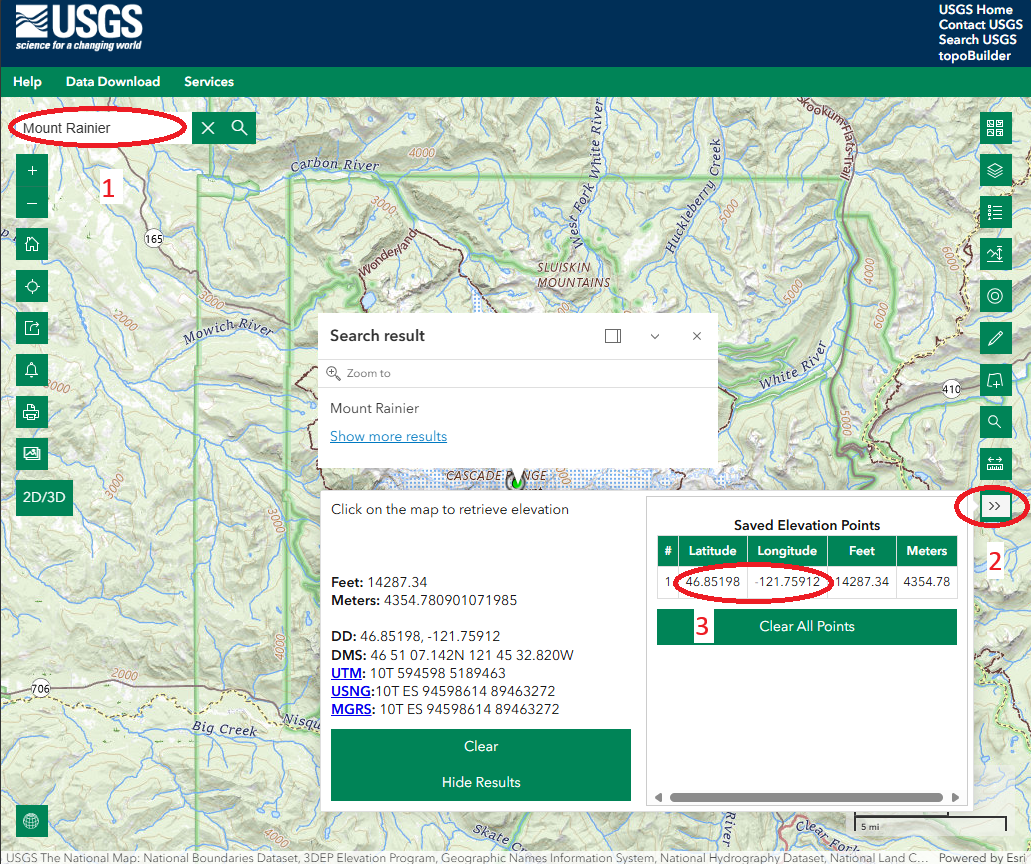
Figure 3. This screen capture shows the national map viewer and how to retrieve the coordinates of a geographic feature. First enter the name into the search box. Then, click on the double arrows on the right, and copy and paste the coordinates marked by the #3 into the proposal form.
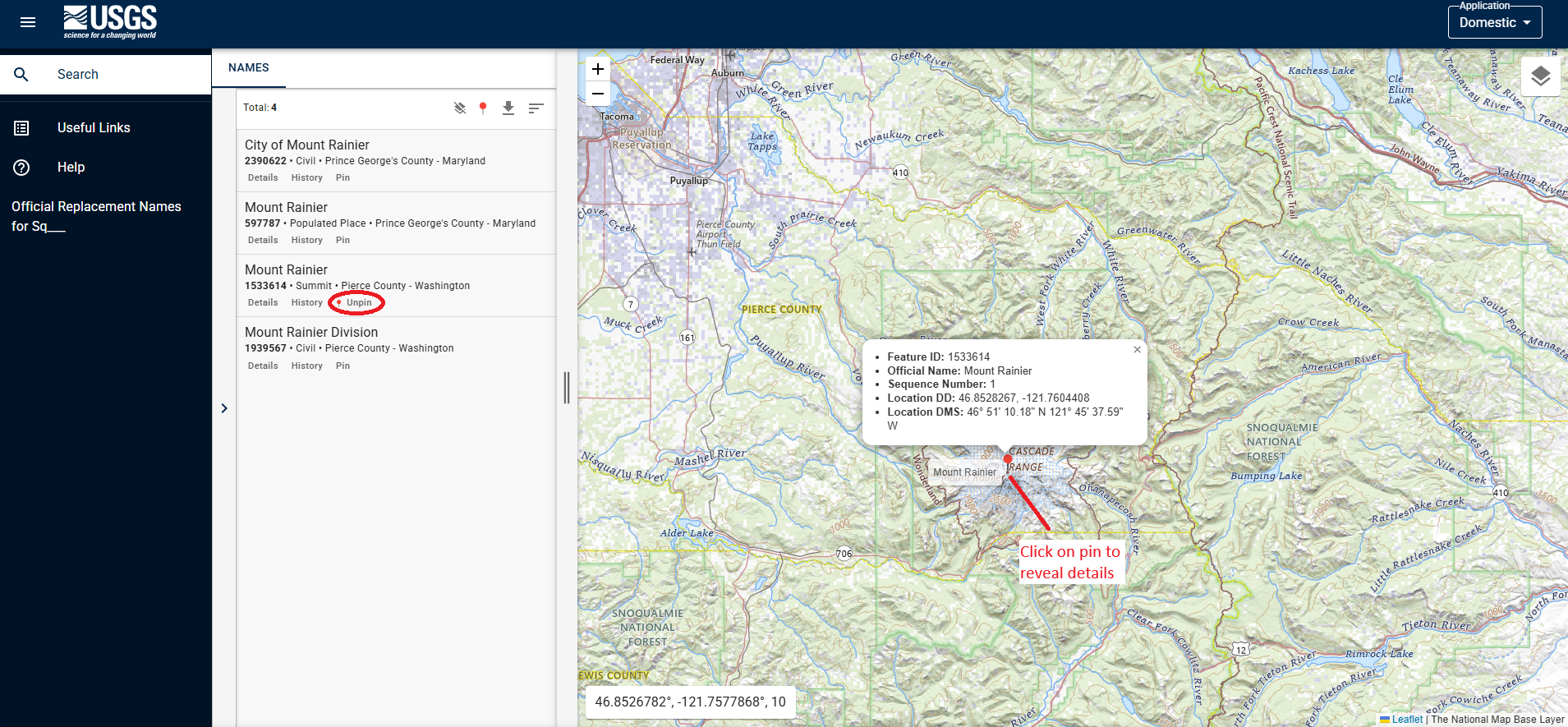
Figure 4 The screen capture shows the popup window from selecting “Pin” on the feature search returns for Feature ID 1533614. From this window, the proponent can record the decimal degree (DD) coordinates of the feature as well as other information.
Pages 7 Through 12 of Proposal Form - Policy Information
The "Policy Information" section covers various aspects of naming. To assist proponents in answering the questions throughout this section, please refer to the Principles, Policies, and Procedures (PPP) document, beginning on page 18. The PPP can be found at USBGN Principles, Policies, and Procedures - Domestic Geographic Names. Additional resources are provided throughout the proposal and should be consulted, to the fullest extent possible. Proponents’ submissions must provide evidence to support statements and claims made in the proposal form.
The proponent must provide answers in all text boxes. If the question is not relevant to the proposal, then please type in “Not applicable” or “NA”. Failure to provide responses in the text boxes, will result in the rejection of the proposal due to being incomplete.
Pages 12 and 13 of Proposal Form - Proponent Details
This section requires contact information of the proponent. In the event any questions arise from the submission packet, or the Board on Geographic Names staff need to conduct a follow up on any of the details, this information will be required. Failure to respond to the staff within a reasonable amount of time will result in rejection of the proposal. Proponents are allowed to have someone submit a proposal on their behalf so long as written communication, acknowledging approval, and directly from the proponent is provided. This information must be received with the proposal submission package.
Proposal Form
When proponents have read through all these instructions, they can download and complete the proposal form.
A pdf version of these instructions is available.